A good professional headshot needs even studio lighting, a clean backdrop, and business-appropriate wardrobe, which is normally hard to get without booking a photographer. This page has seven Gemini prompts that turn a regular phone photo into a headshot you can use on a professional networking profile, a company page, or a resume, each one describing wardrobe, lighting, backdrop color, and framing in enough detail to look consistent and professional rather than obviously edited. Copy a prompt, open a Gemini chat, attach a clear, front-facing photo, and paste the prompt as your message; a sample image next to each prompt shows the target result. Small changes are easy to make: swap 'navy blazer' for 'charcoal blazer,' or change 'grey studio backdrop' to a color that matches your company branding. Two problems come up most often. If the source photo is taken from far away, at a strong downward angle, or in dim light, the face can look less like you, so start with a photo taken roughly at eye level in good light. If the backdrop looks patchy or uneven, ask Gemini in a follow-up message to make the backdrop a single flat color. These prompts keep hair, expression, and facial features close to your original photo and only change wardrobe, lighting, and background, so the result still looks like a real photo of you, not a cartoon or an illustration. No studio booking, signup, or extra software is required.
Sample images were made by running each exact prompt in ChatGPT's image generator on an AI-generated stand-in photo. Results in Gemini will look similar but not identical.
#1
Restyle the person in the photo as a classic corporate headshot: a tailored navy blazer over a collared shirt, soft even studio lighting, a seamless light-grey backdrop, natural color grading, and a close-up crop from the chest up with a relaxed, confident expression.
Swap 'navy blazer' for 'black blazer' to match your wardrobe.
Copies the prompt; just paste it in Gemini
#2
Turn the person in the photo into a modern creative-industry headshot: a smart-casual sweater or shirt with no tie, warm natural window light, a softly blurred open-office background, gentle color grading, and a half-body framing with arms relaxed at the sides.
Copies the prompt; just paste it in Gemini
#3
Reimagine the person in the photo as an executive-style headshot: a charcoal suit jacket, crisp white shirt, dramatic soft side lighting, a dark navy gradient studio backdrop, rich contrast, and a tight close-up crop with a direct, confident gaze at the camera.
Add 'warmer color grading' if the navy gradient feels too cold.
Copies the prompt; just paste it in Gemini
#4
Convert the person in the photo into a natural-light outdoor headshot: business-casual attire such as a blazer over a plain top, soft diffused daylight in open shade, a softly blurred green outdoor backdrop, true-to-life color, and a half-body framing.
Mention 'blurred office window' instead of greenery for an indoor feel.
Copies the prompt; just paste it in Gemini
#5
Style the person in the photo as a clinical professional headshot: a white coat or collared scrub top, bright clean studio lighting, a plain white or pale-blue backdrop, neutral color grading, and a close-up crop with a warm, approachable expression.
Copies the prompt; just paste it in Gemini
#6
Make the person in the photo look like a finance-industry headshot: a tailored suit in a neutral color, warm beige studio backdrop, soft key light with a subtle rim light, polished color grading, and a half-body framing with one shoulder slightly angled.
Copies the prompt; just paste it in Gemini
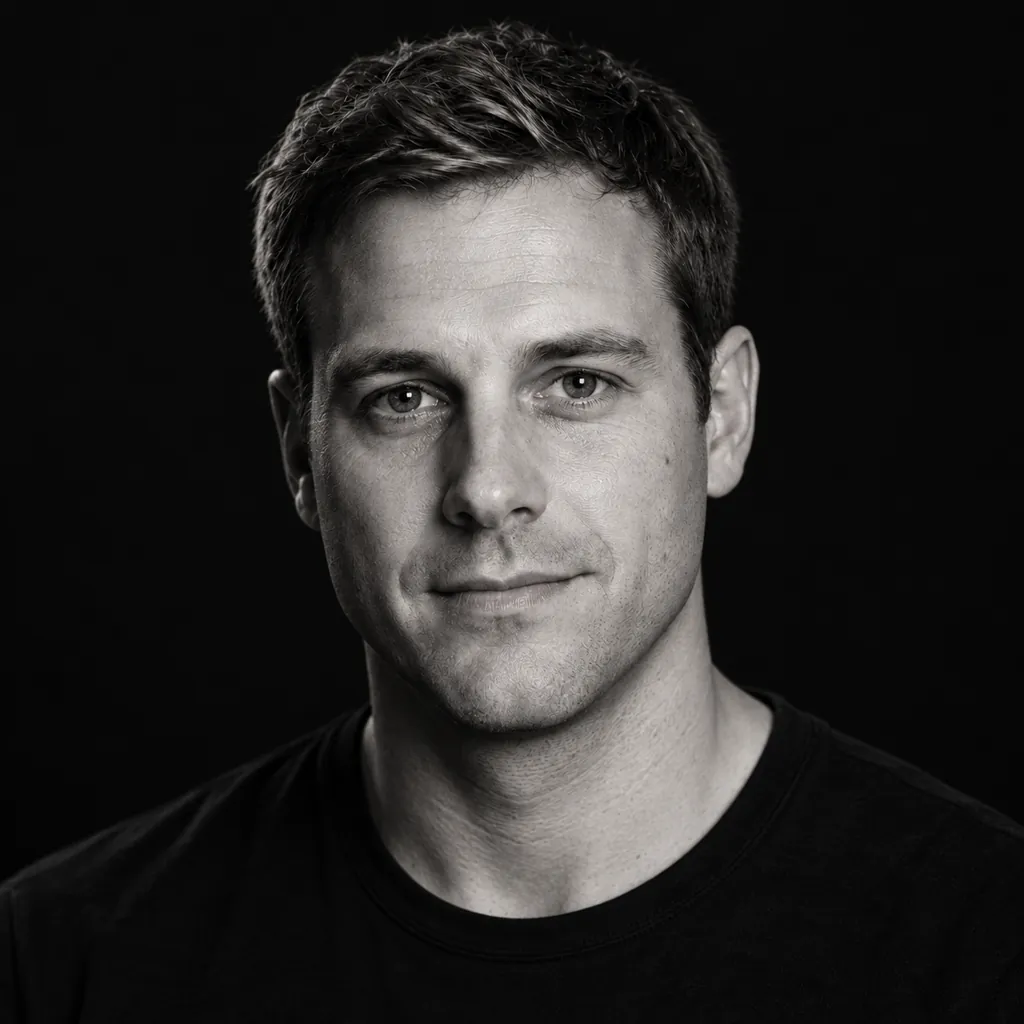
#7
Place the person in the photo against a plain black backdrop for a startup-style headshot: a simple crew-neck shirt or light jacket, dramatic single-source lighting from one side, high-contrast black-and-white or muted color grading, and a tight close-up crop.
Ask for 'full color' if you'd rather skip the black-and-white option.
Copies the prompt; just paste it in Gemini
Frequently asked questions
Why doesn't the result look like me?
Start with a photo taken roughly at eye level in good light. A photo taken from far away, at a strong angle, or in dim light makes it harder for Gemini to keep your real facial features accurate.
Can I use this on a photo of a colleague building their own profile?
Yes, as long as it is a photo you have permission to edit, such as a colleague or teammate. Attach their photo and the same prompt builds the same headshot style for them.
Will this work with a casual selfie, or do I need a professional photo to start?
A clear, well-lit selfie works fine as a starting point. Gemini keeps your face and changes the wardrobe, lighting, and background, so you do not need a professional photo to begin.
Can I request a specific brand color for the backdrop?
Yes, reply in the same chat and name the color, for example 'backdrop in a deep green,' and Gemini will adjust the background while keeping the pose and lighting style.